Selection of a file


|
Selection of a file |
|
|
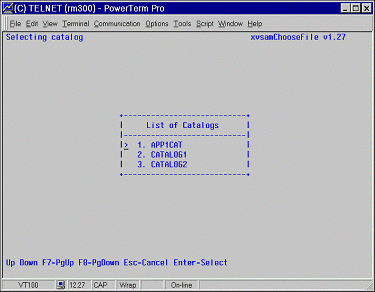
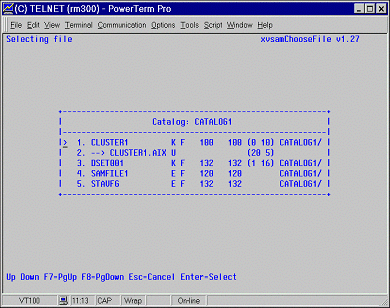
Before performing any kind of operation on an already existing base cluster, you are required to select its name. Entering 2 in the CHOICE field of main menu causes the following map to be displayed: xvsamAdm searches the information contained in the Master Catalog File (Catalog file in the directory indicated by the XVSAM environment variable), and it builds up a list of all the available XVSAM user catalogs. The first ten catalog names, sorted in ascending alphabetic sequence, are listed in the dialog box presented in the middle of the screen. By moving the cursor by means of the Up and Down Arrow keys, you can choose the Catalog in which the file you intend to process is located. To speed up the searching of the Catalog, you can also use the F8 and F7 function keys, which scroll the list respectively one page forwards or backwards. The <ESC> key terminates the file selection and control is returned to the main menu. As soon as you have selected the Catalog you are interested in, you are required to specify the name of the cluster file you want to processed by means of the SELECTING FILE panel:
On the dialog box, in the middle of the screen, all the base cluster / alternate indices entries contained in the selected catalog are listed. You can scroll them up and down until the name of the desired cluster has been reached. All clusters, together with their related alternate index files are listed, sorted alphabetically by name. Alternate index (AIX) files are marked by the --> sign, and they are listed immediately after the name of the corresponding base cluster . The following information is furthermore shown:
K for KSDS E for ESDS R for RRDS For alternate index files only: D indicates that duplicated keys are allowed U indicates that duplicate keys are not allowed (UNIQUE KEY)
F for fixed length records V for variable length records
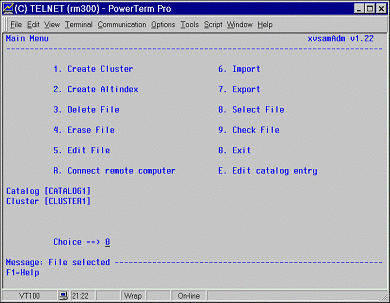
The following function keys are available : Cursor keys to scroll among fields Escape key to go back Enter key to choose one entry As soon as the Catalog and the cluster you intend to process have been selected, these two information are shown in the xvsamAdm main menu panel as shown below:
All operations listed in the following require a previous selection of the file to be processed. |