Import of data


|
Import of data |
|
|
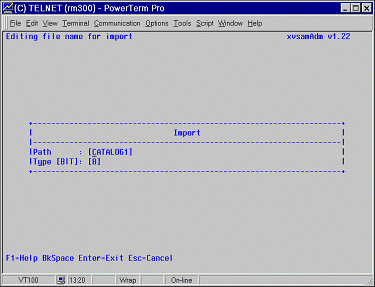
This function can be used to load into an XVSAM cluster a UNIX flat file, already in ASCII code. This file can be both the result of converting mainframe archives, or the output of a UNIX native procedure, or whatever else is recognized to be a flat file. If you have entered 6 in the CHOICE field, the panel shown in the next figure will then be displayed.
The TYPE field serves to specify which kind of data are to be imported. The following two types are possible :
As soon as the <ENTER> key is pressed, data will be imported. Once the process is terminated, the xvsamAdm main menu panel is displayed and the message line updated with the following information: Message: Import read[159] written[159] ----------------------------- The message line informs you about the number of records found in the source file and the number of records written on the XVSAM data set. If they correspond, then the data set has been correctly imported, otherwise a problem may have occurred during the import phase and it will be necessary to correct it before repeating the operation. The most common problems which can arise are: Message: Error Importing file: No such file or directory ---------- Information supplied in the PATH field is invalid; check the existence of the directory and of the source data set on it. The number of read records is higher than the number of written records. Such a situation can arise in the following cases:
The following function keys are available :
|