|
To create a new base cluster, enter 1 in the selection field of the main menu.
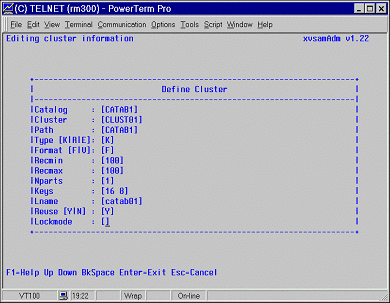
Validation of your choice, which takes place when the <ENTER> key is pressed, produces the display of the EDITING CLUSTER INFORMATION window:
On this screen, the following information should be entered :
| • | Catalog it is the name of the Catalog to which the cluster belongs to. The physical location of the file may be given by means of the PATH parameter. When the referenced Catalog does not yet exist, it is automatically created. Its name may be up to 44 characters long, and it must be conform to the UNIX naming conventions. |
| • | Cluster here the logical name of the base cluster should be entered. This name too may be up to 44 characters long. |
| • | Path is the name of the directory where the physical file, containing user data, is located. The assigned path name is built up automatically by suffixing the name of the Catalog to the XVSAM path. For easiness, it is suggested to use the same name for the Catalog and its path. |
Here the data organization is specified. The three possible data organizations are:
K for KSDS
E for ESDS
R for RRDS
Here the record format can be entered:
F for fixed length records
V for variable length records
| • | Recmin In the Recmin field you should supply the minimum record length, in bytes, allowed for the data set. |
| • | Recmax In the Recmax field you should supply the maximum record length, in bytes, allowed for the data set. In the case of a file with fixed length records, Recmin and Recmax have the same value. |
| • | Nparts This field is used for defining the number of parts the primary key of a cluster file is composed by. Such a feature has no correspondence in the VSAM environment, where the fields composing a primary key must be contiguous. It is only used for reasons of compatibility with the Siemens product LEASY, where a key field may also be composed by not contiguous areas. For VSAM files Nparts is always set to 1, while for ESDS and RRDS files, this field should be kept to zero. |
| • | Keys if the file organization is KSDS, the characteristics of the key should be specified using the following scheme : |
[offset keylength offset keylength ...]
offset is the displacement of the key from the beginning of the record and relative to zero;
keylength is the length of the key in bytes.
For VSAM files only one pair of values is allowed, while for LEASY files, more than one pair can be specified.
| • | Lname it serves to specify the logical name. The logical name can be maximal 8 bytes long. It is reserved for future use. |
| • | Reuse one byte indicator to specify if the file is reusable or not. Possible values are: Y or N. If set to Y (yes) OPEN OUTPUT on non-empty files is allowed. If N is set error 712 is returned if an OPEN OUTPUT operation is tried on a non-empty file. |
| • | Lockmode Lock management: |
M – manual lock forced
A – auto lock forced
E – exclusive lock forced
D – lock mode specified by caller
While defining a base cluster with ESDS or RRDS organization, the Key fields are automatically skipped.
The following function keys are available :
PF1 to invoke the on-line Help
Cursor keys to move among fields
Escape key to interrupt the definition of the cluster and to return to the main menu
Enter key to make the base cluster definition active
| 

