xvsamAdm


|
xvsamAdm |
|
|
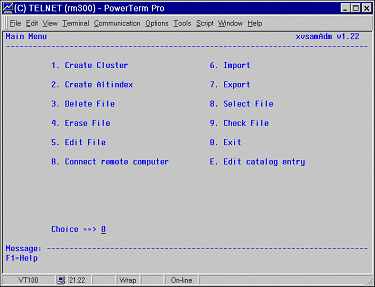
XVSAM Access Method Administration Service, is a utility program which provides the possibility to create, update or delete XVSAM objects in one or more XVSAM catalogs. The product is comparable with the IBM mainframe tool IDCAMS, running in DOS/VS, VSE or OS/390 environment. xvsamAdm can only operate in an interactive mode. To start xvsamAdm just enter the command xvsamAdm at the shell prompt. The following screen will appear on your screen:
This is the main menu of xvsamAdm. It provides you the possibility to choose among the following 12 functions : 1. Create Cluster to create the catalog definition for a cluster file you intend to handle under XVSAM 2. Create Altindex to create a catalog definition of an alternate index for an already existing base cluster 3. Delete file to delete a base cluster or an alternate index previously selected. The file content and its catalog definition are removed. 4. Erase file to clean a base cluster or an alternate index previously selected. Only the file content is cleaned; its definition in the catalog remains unchanged. 5. Edit file to edit the content of a base cluster or an alternate index 6. Import to import binary or text files into the XVSAM system 7. Export to export XVSAM files as binary or text files 8. Select file to select a base cluster or an alternate index on which you intend to perform afterwards XVSAM operations like Delete, Erase, Import, Export etc. 9. Check file to check characteristics of the base cluster R. Connect remote computer to connect a remote xvsamServer, running on the same or another server E. Edit catalog entry to edit the properties of the selected cluster or alternate index 0. Exit to leave xvsamAdm and to return to UNIX level. By entering on the prompt: Choice ==> _ the number or letter corresponding to the desired function, you may directly invoke it. The message line MESSAGE: is used for displaying eventual error messages or missing information. By pressing the <ESC> (ESCAPE) key, you can leave xvsamAdm and return to UNIX command level. The on-line HELP function supplies you information about the use of xvsamAdm can be invoked from all panels, simply by pressing the F1 key.
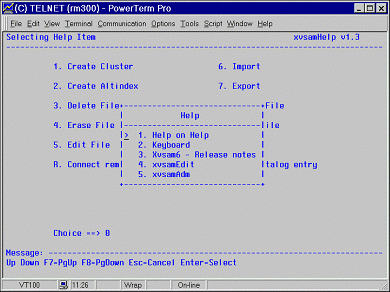
Different on-line help items can be chosen : 1. Help on Help general information about the using of HELP 2. Keyboard function keys meaning 3. Xvsam6 – Release notes release notice and technical information about XVSAM 4. xvsamEdit help about the xvsamEdit feature 5. xvsamAdm general information about xvsamAdm To choose an item, you should place the cursor >, by means of the Up and Down Arrow keys, in front of the wished item and then press the <ENTER> key. |