Erasing a file


|
Erasing a file |
|
|
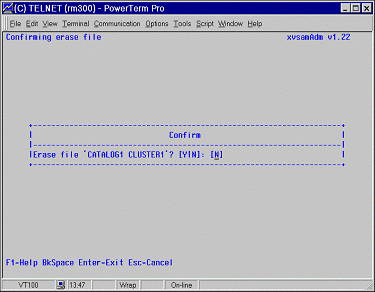
The ERASE FILE function allows you to clean and zeroise an XVSAM cluster without removing its definition from its relative catalog. This can be done through entering - 2 - ERASE FILE in the selection field of main menu, after having ensured that a valid cluster name has been selected. Enter “Y” to confirm erasing, “N” to abort the operation WARNING: The erase function cleans the content of a file, which cannot be therefore recovered; it has the same effect as the UNIX rm command. The following function keys are available :
Delete a vsam file As an alternative to the ERASE FILE function, which only removes the cluster from the file system, the DELETE FILE function deletes the cluster and removes its definition from the relative catalog. When an alternate index is deleted by using this function, only the catalog entry is deleted. The deletion of a KSDS cluster leads to the deletion of all its alternate keys too. A catalog is automatically deleted as soon as the last cluster contained in it has been deleted. The directory with the same name of the catalog, if existing, is also automatically removed under $XVSAM. The procedure for deleting a file is exactly the same as for erasing it, except that - 3 -. DELETE FILE must be chosen in the main menu. WARNING: The delete function physically removes the XVSAM file from the UNIX file system, and it cannot be therefore recovered Check file This function, accessed by typing - 9 - in the main menu, provides you the possibility to control if the file characteristics contained in the XVSAM catalog are compatible with information available to C-ISAM for a specific data set. In case of congruity the confirmation message Message: File O.K. is sent back, while in case of not compatible information, the following message will appear on the message line: Message: Error checking file: data_set_name
|