Session management


|
Session management |
|
|
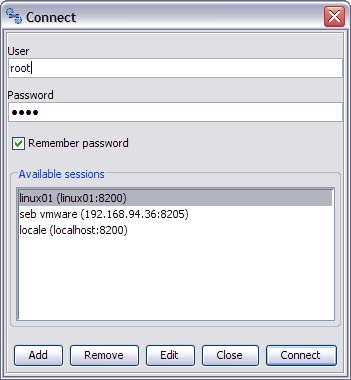
The session represents the set of information to locate and connected an XBM instance. Once defined, the session may be used at any time, together with username and password, to connect the console to the desired instance. The Session dialog allows to manage the sessions, and to connect one of the defined one.
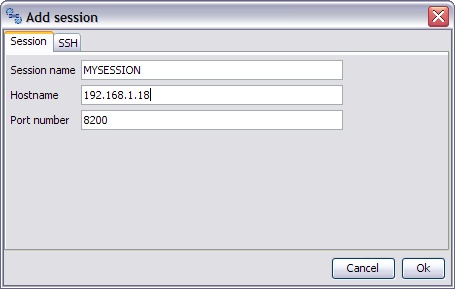
To connect a predefined session, just enter username and password, select the session you want to attach and press "Connect". Session definition More than one session may be defined and managed. The session must contain:
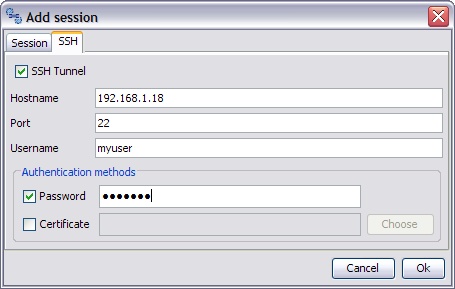
SSH Tunnel Sometimes, due to network configuration or for security reasons, it may be necessary to connect the XBM instance using an SSH tunnel. In this situation, all the XBM communication streams are tunnelled into an SSH connection. Therefore it is necessary to have a valid SSH connection to a system that can reach the XBM instance and database: normally this system is the same one that runs XBM, but also different systems may be used as "bridge". To enable the tunnelling, the SSH tunnel check-box must be flagged and hostname, port and user name for the SSH connection must be defined.
XBM supports SSH2 protocol with password and certificate authentication methods. At least one authentication method must be selected. Note: If you use the password authentication mechanism and you want to store the SSH password in the session definition, remember that XBM will store that password in a clear text file. If the password is not stored, XBM will ask for it at each connection. Please note that the XBM user and SSH use are two different entities: the first one is defined in the XBM database and it is known only to the XBM instances; the second one is defined to the system connect via SSH. Also the XBM hostname/port and SSH hostname/port are different entities: the first one is the location of the XBM instance (as seen by the SSH host) and the second is the location of the SSH service as seen by the local workstation. |