Application environment setup

Top  Previous  Next

To set up an XFRAME based application environment, you have to proceed as follows.

User definition

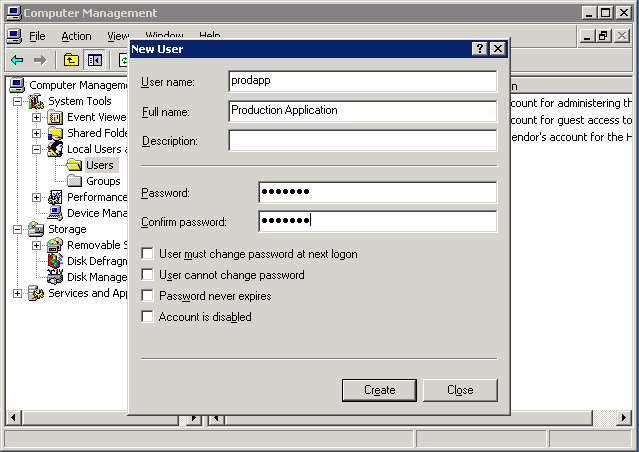
An user must be defined to own the application items, and to run the application processes (XCICS regions, jobs, XBM agents, etc.).

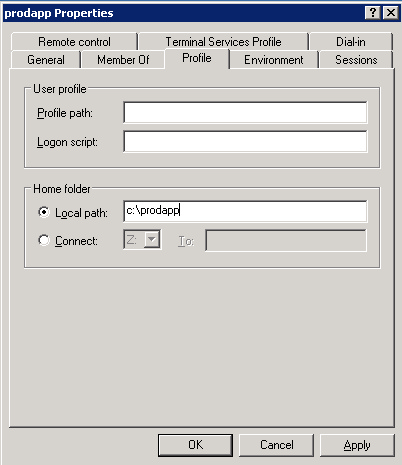
and its HOME directory, should be set on a proper location. I.e

.

Security rights

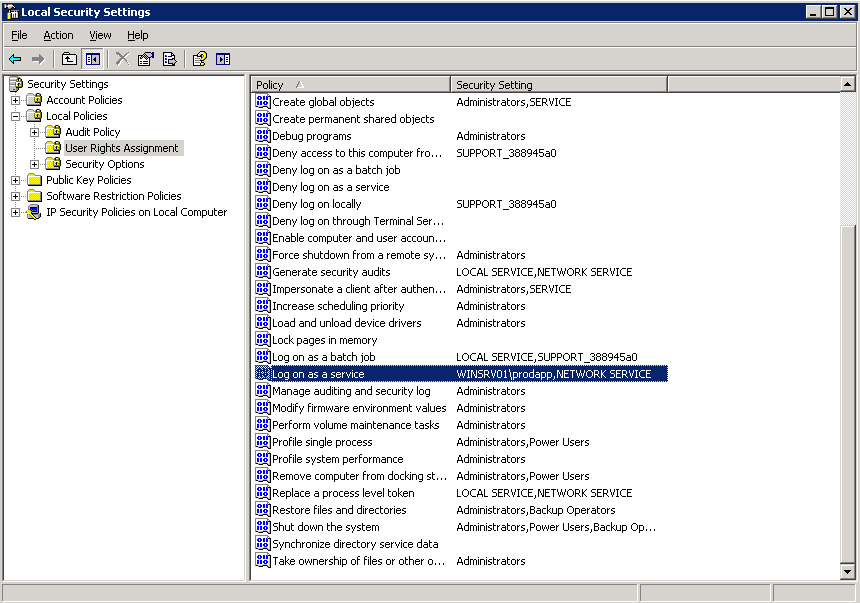
The user defined should also have the following security rights:

Log on as service
Create global objects (only if Oracle is required)

Environment variables

Some environment variables must be correctly defined and configured to ensure the correct XFRAME functionality:

Environment name

Description

XFRAMEHOME

it refers to the current XFRAME setup. It is set a system wide variable by the XFRAME setup procedure but, if you installed different XFRAME versions on the same system and you want to use the non-default one, you have to override this variable.

JAVA_HOME

it paths to the JDK environment to be used. I.e. "C:\Program Files\Java\Jdk1.6.0".

ACUCOBOL

(optional) if ACUCOBOL compiler is used, the path to the ACUCOBOL GT setup folder. I.e. "C:\Acucorp\Acucbl721\AcuGT".

COBDIR

(optional) if Microfocus COBOL compiler is used, the path to the Microfocus COBOL setup folder. I.e. "C:\Microfocus\cobol".

PATH

The user PATH must include the following folder:

%XFRAMEHOME%\bin
%JAVA_HOME%\jre\bin\server
%JAVA_HOME%\bin
%ACUCOBOL%\bin or %COBDIR%\bin
%PATH%

XVSAM

the path to the XVSAM repository of the application. I.e. "C:\prodapp\data"

HOME

The full path of the user's HOME directory. I.e. "C:\prodapp"

Directory structure

Even if the directory structure may be set up according to any standard, we suggest to follow the indications provided in the Environment setup section of the Migration Process guide.