DB2 to SQL Server


|
DB2 to SQL Server |
|
|
Encoding data conversion is defined as the changing of character-set in data from EBCDIC to ASCII. The easiest way to perform this task for DB2 EBCDIC data is download its in flat file and converts its as common EBCDIC flat file through programs conversion. At the end of conversion reload ASCII data on SQL Server database. In order to replicate DB2 objects schema is mandatory obtain from customer the up-to-date DDLs. xddlconv analyzing ddls produce 3 different source.
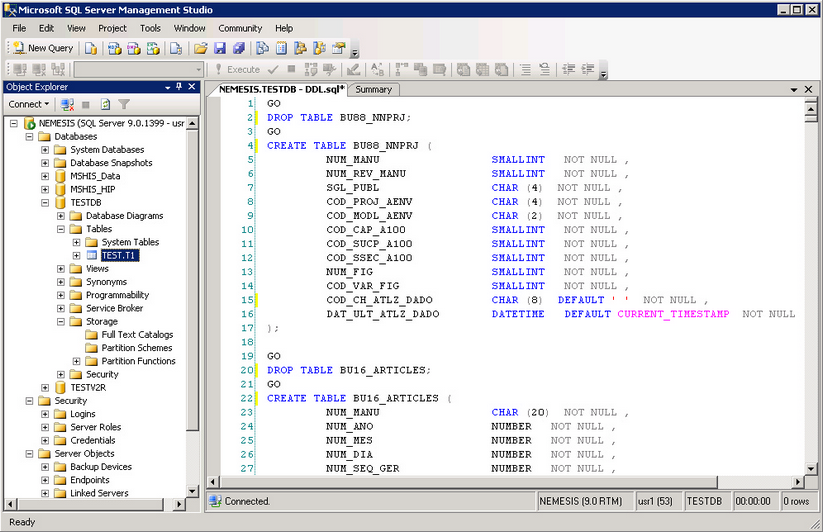
Analyze DDLs DDLs have to be processed by xddlconv utility. See more detailed information in XCONV book. Create SQL Server workspace In order to replicate DB2 database you have to create user and tablespace. Tablespaces size depends on amount of data. After tablespace and user definition, tables have to be created. In order to upload data quickly and without hierarchy priority problem we suggest to create index at the end of uploading step. In fact xddlconv utility separates index and table source. Submit all files produced by xddlconv utility using the user just created. These files may be used by SQL Server Management Studio (as shown in the picture below) and by sqlcmd.
Example by command line: C:\> sqlcmd -U usr1 -P usr1 -S sql01 -f DDL.sql Data conversion Data files coming from mainframe DB2, downloaded according to the precedure described in the previous chapter, are flat file and therefore they must be converted as any other sequential file. For this reason xddlconv generates the COBOL copybooks that represent the record structure of the files coming from the mainframe. These copybooks must then be processed by cpy2xml and then by xmlconverter to generate all the necessary conversion programs, to be compiled and run to get the converted file. Please refer to the file migration guide to get more information about flat file translation. Just remember that copybooks generated by xddlconv have no redefined structures or overlapping data: therefore data conversion for these will be 100% automatic, without any manual intervention. As example, let's suppose TABLE1.cpy being generated by xddlconv for table TABLE1. You have to build the XML descriptor for the table and to produce the COBOL conversion program. cpy2xml -o TABLE1.xml TABLE.cpy Now you have to compile TABLE1.cbl with your COBOL compiler and run it, according to the instructions provided in the File Migration guide. Data upload Once file is converted from EBCDIC to ASCII it must be uploaded in the database. Unfortunately it is not possible to use the SQL Server utility bcp, because it does not support the data formats coming from the mainframe (packed data). In order to avoid an additional step to normalize data according to the bcp requirements (the would imply a longer conversion time), XCONV can generate dedicated loader for the converted files. These loaders are C# programs that read the ASCII files and insert the data in the corresponding SQL Server table, using ADO. You must generate a loader for each table. Loader generation To generate a table loader, you need the XML description of the table (the same file produced by cpy2xml you used at conversion time). Using this file, you may create the loader program, using again xmlconverter with the option --mssql-loader. Example: xmlconverter --mssql-loader -o Table1.cs TABLE.xml It generates a C# source named according to -o option (Table1.cs in the example above), which contains the logic to load the data, and two accessory sources (IProgramLoader.cs and Loader.cs) in the same path of the output source, if they cannot be found at generation time (this means that these 2 files are generated only the first time you create a converter). These files must be compiled with the C# compiler using: csc /out:<exename>.exe IProgramLoader.cs Loader.cs <tablename>.cs Example: csc /out:load_table1.exe IProgramLoader.cs Loader.cs Table1.cs Loader execution The loader program generated according to the procedure above, must be executed to load the data file in the database. The loader accepts the following options:
The loader recognizes the following environment variables:
Example: load_table1 -F TABLE1.ASC -s 'server=(local)\SQLEXPRESS;database=DBTEST;Integrated Security=SSPI' -c 100 |